异常
idea 代码块快捷键ctrl+alt+t
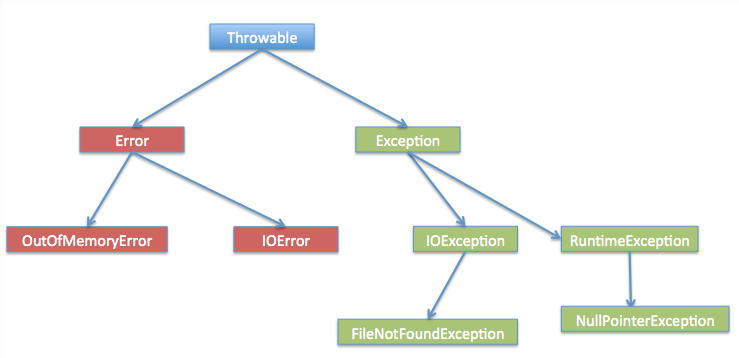
1、异常的分类
- 运行时异常
- RuntimeException 运行时异常,可处理,可不处理
- 编译时异常
- CheckedException 编译时异常,必须处理
常见的运行时异常
| 异常类 | 说明 |
|---|---|
| NullPointerException | 空指针异常 |
| ArrayIndexOutOfBoundsException | 数组越界异常 |
| ClassCastException | 类型转换异常 |
| NumberFormatException | 数字格式化异常 |
| ArithmeticException | 算术异常 |
2、异常的产生和传递
// 如果divide中没有处理异常,那么会一直传递到main中
public class Transmit {
    public static void main(String[] args) {
        operation();
    }

    public static void operation() {
        divide();
    }

    public static void divide() {
        Scanner sc = new Scanner(System.in);
        System.out.println("请输入第一个数字");
        int a = sc.nextInt();
        System.out.println("请输入第二个数字");
        int b = sc.nextInt();
        System.out.println(a / b);
    }
}
3、异常处理
- try:执行可能产生异常的代码
- catch:捕获异常,并处理
- finally:无论是否发生异常,代码总能执行
- throw:手动抛出异常
- throws:声明方法可能要抛出的各种异常
try...catch
import java.util.Scanner;

public class Transmit {
    public static void main(String[] args) {
        Scanner sc = new Scanner(System.in);
        try {
            System.out.println("请输入第一个数字");
            int a = sc.nextInt();
            System.out.println("请输入第二个数字");
            int b = sc.nextInt();
            System.out.println(a / b);
            // 使用最顶级的异常错误,确保能捕获所有的异常
        } catch (Exception e) {
			// throw new RuntimeException(e);
            e.printStackTrace();  // 打印异常信息 (红色)
			// System.out.println(e.getMessage()); // 打印异常信息
        }
        System.out.println("结束了");
    }
}
try...catch...finally
import java.util.Scanner;

public class Transmit {
    public static void main(String[] args) {
       	Scanner sc = new Scanner(System.in);
        try {
            System.out.println("请输入第一个数字");
            int a = sc.nextInt();
            System.out.println("请输入第二个数字");
            int b = sc.nextInt();
            System.out.println(a / b);
        } catch (Exception e) {
			// throw new RuntimeException(e);
            e.printStackTrace();  // 打印异常信息 (红色)
			// System.out.println(e.getMessage()); // 打印异常信息
        } finally {
            sc.close();
        }
        System.out.println("结束了");
    }
}
多重 catch
第一次捕获的异常不能是Exception,不然第一次就被捕获了,后面的异常就捕获不到了
- 子类异常在前,父类异常在后
- 发生异常事按顺序逐个匹配
- 只执行第一个雨异常类型匹配的
catch语句 finally可写,可不写
import java.util.InputMismatchException;
import java.util.Scanner;

public class Transmit {
    public static void main(String[] args) {
        Scanner sc = new Scanner(System.in);
        try {
            System.out.println("请输入第一个数字");
            int a = sc.nextInt();
            System.out.println("请输入第二个数字");
            int b = sc.nextInt();
            System.out.println(a / b);
        } catch (InputMismatchException e) {
            System.out.println("InputMismatchException 异常");
        } catch (Exception e) {
            System.out.println(e.getMessage());
        } finally {
            sc.close();
        }
        System.out.println("结束了");
    }
}
try...finally
- 不能用于异常的捕获,仅仅用来当发生异常时,用来释放资源
- 一般用在底层代码,只释放资源,不做异常处理,把异常向上抛出
4、声明异常 (throws)
底层代码向上声明或者抛出异常,最上层一定要处理异常,否则程序中断
import java.util.Scanner;

public class Transmit {
    public static void main(String[] args) {
        // sum 抛出了异常,这里进行处理
        try {
            sum();
        } catch (Exception e) {
            System.out.println(e.getMessage());
        }
    }

    // 因为 divide 抛出了异常,如果这里不处理,就要接着往上抛出
    // 可以同时抛出多个异常
    public static void sum() throws Exception, InputMismatchException {
        divide();
    }

    // 通过 throws 抛出异常
    public static void divide() throws Exception {
        Scanner sc = new Scanner(System.in);
        System.out.println("请输入第一个数字");
        int a = sc.nextInt();
        System.out.println("请输入第二个数字");
        int b = sc.nextInt();
        System.out.println(a / b);
        System.out.println("结束了");
    }
}
5、抛出异常(throw)
// 使用类
public class Cast {
    public static void main(String[] args) {
        Person person = new Person();
        person.setAge(12);

        // setSex 抛出了异常,这里必须进行捕获
        try {
            person.setSex("男");
        } catch (Exception e) {
            System.out.println(e.getMessage());
        }
    }
}

// 声明类
public class Person {
    private int age;
	private String sex;

    // 如果抛出的是 Exception 异常,那么方法上就必须声明异常
    public void setSex(String sex) throws Exception {
        if (sex.equals("男") || sex.equals("女")) {
            this.sex = sex;
        } else {
            throw new Exception("性别错误");
        }
    }

    // 如果抛出的不是 Exception 异常,那么方法也可以不用声明异常
    public void setAge(int age) {
        if (age < 0 || age > 100) {
            throw new IllegalArgumentException("年龄异常");
        }
        this.age = age;
    }
}
6、自定义异常
// 自定义异常
// 继承某个异常类,使用alt + insert 快速补充类即可
public class AgeException extends RuntimeException {
    public AgeException() {
        super();
    }

    protected AgeException(String message, Throwable cause, boolean enableSuppression, boolean writableStackTrace) {
        super(message, cause, enableSuppression, writableStackTrace);
    }

    public AgeException(Throwable cause) {
        super(cause);
    }

    public AgeException(String message, Throwable cause) {
        super(message, cause);
    }

    public AgeException(String message) {
        super(message);
    }
}

// 使用异常
public class Person {
    private int age;

    public void setAge(int age) {
        if (age < 0 || age > 100) {
            throw new AgeException("年龄异常");
        }
        this.age = age;
    }
}
7、方法覆盖
带有异常声明的方法重写
- 方法名,参数列表,返回值类型必须和父类相同
- 子类的访问修饰符合父类相同或是比父类更宽
- 子类中的方法,不能抛出比父类更多、更宽的检查时异常